
A solar camera with SIM card combines an outdoor camera, an on-site solar power system, and cellular data in one installation. The panel charges a battery, the battery powers the camera through nights and cloudy periods, and the SIM card lets the camera or its connected 4G router send live video, snapshots, and alerts without a fixed internet connection. This makes the setup useful where mains electricity and site Wi-Fi are unavailable.
The exact architecture varies by system. Some cameras include the cellular modem internally, while others connect to a separate 4G router inside a weatherproof power enclosure. The design of the site, monitoring mode, and local mobile coverage matter more than the product label alone.
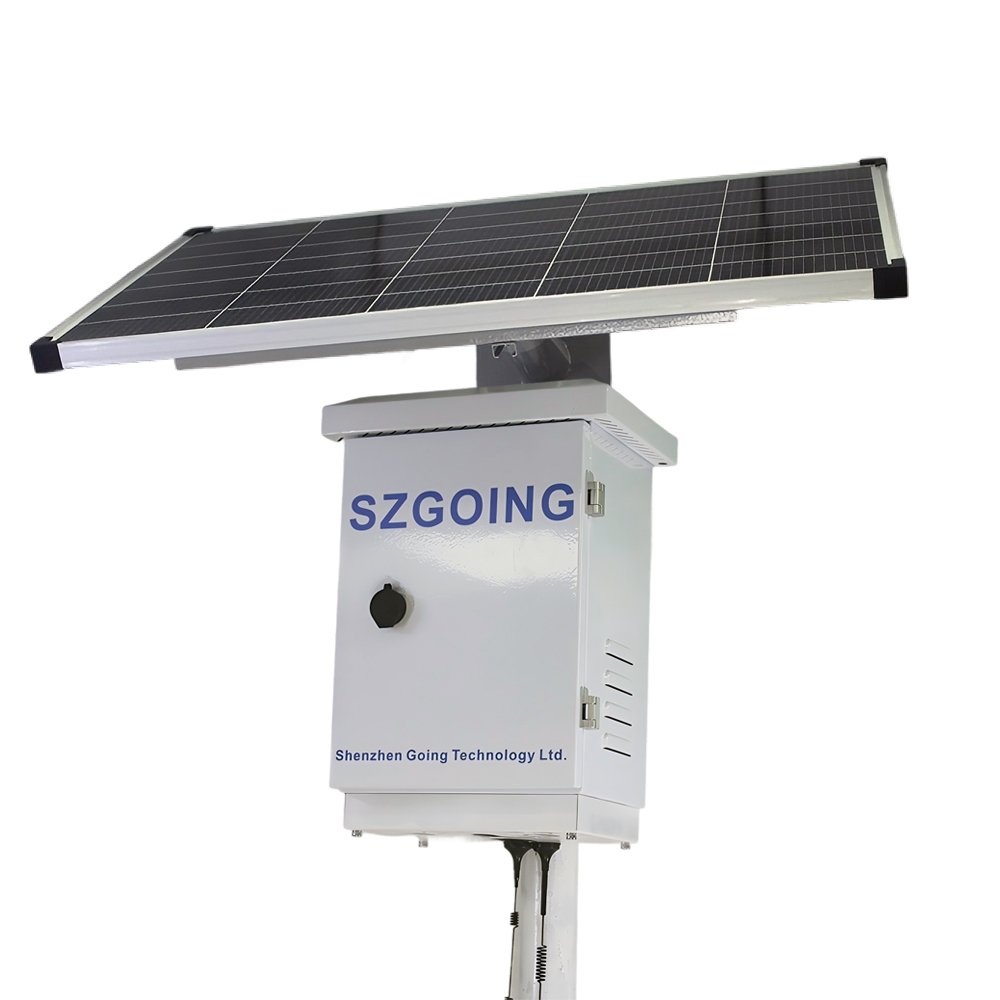
What a solar camera with SIM card includes
A complete system generally has five functional parts. Not every product combines them the same way, so confirm the included components before ordering.
| Part | What it does | What to check |
|---|---|---|
| Solar panel | Recharges the battery from daylight | Panel wattage, mounting angle, shade, and seasonal sun hours |
| Power controller | Regulates charging and power distribution | Voltage, current rating, battery compatibility, and enclosure protection |
| Battery | Runs the camera at night and during low-sun periods | Chemistry, usable capacity, operating temperature, and expected daily load |
| Camera / 4G router | Captures video and connects to the mobile network | Camera resolution, power use, supported LTE bands, and local recording options |
| SIM data plan | Carries remote video, snapshots, and alerts | Carrier coverage, data allowance, APN settings, and whether live streaming is required |
How solar power keeps the camera running
The solar panel must produce more energy than the camera consumes during a representative day. Overnight operation comes from the battery, and the system must also carry the site through cloudy or rainy periods. A larger panel alone does not solve a battery-reserve problem, and a larger battery does not recharge itself without enough usable sunlight.
Camera load depends on several settings: resolution, frame rate, night-time infrared, PTZ movement, speaker use, and whether the camera records continuously or only after motion detection. A remote construction site that uses frequent PTZ patrols and live viewing generally needs more energy than a camera that records short event clips.
Panel angle, shade, dust, and winter sun hours also affect performance. Size the system for the worst expected season rather than a clear summer day. For a detailed sizing method, read how to choose battery and solar panel size for a jobsite camera.
How the SIM card carries camera data
A SIM card provides the identity and data service that connects the camera system to a mobile network. With adequate LTE coverage, the camera can send event clips, still images, notifications, or live video without a fixed broadband line. The available functions depend on the specific camera, router, app, and configuration.
There are two common arrangements:
- Integrated cellular camera: the camera has its own SIM slot and mobile modem. This reduces the number of devices but limits how other equipment can share the connection.
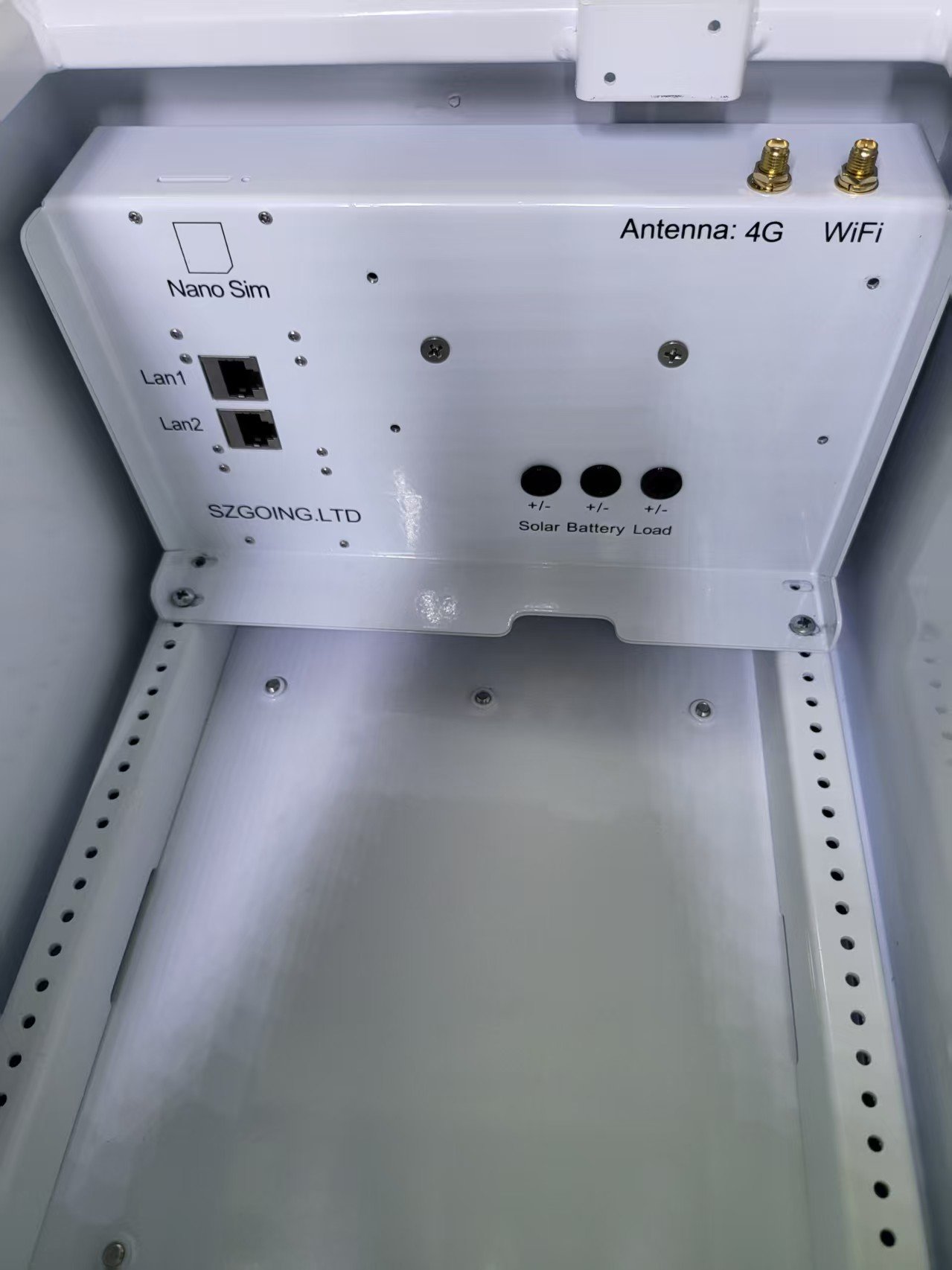
- Camera plus 4G router or power box: the camera connects by Ethernet or Wi-Fi to a separate cellular router. A weatherproof power box can also manage solar charging and support additional network equipment.
For camera-included systems, compare 4G solar security cameras. For a separate power and networking base, see the CS100-G432 solar power and 4G IoT box.
What affects SIM data consumption
Data use is not determined by the SIM card alone. It depends on what the system uploads and how often. Continuous high-resolution live viewing usually consumes far more data than occasional snapshots or short motion-triggered clips.
| Monitoring behavior | Relative data use | Planning note |
|---|---|---|
| Periodic snapshots or short event clips | Lower | Match upload frequency to the site risk and cellular plan |
| Frequent event-video uploads | Moderate to higher | Consider resolution, clip length, and daily events |
| Long remote live-view sessions | High | Use only when the carrier plan and coverage support it |
| Local recording with remote alerts | Depends on upload settings | Local storage does not automatically reduce all uploaded traffic |
Data allowances vary by carrier, destination, and package. Confirm whether the plan supports the camera or router, whether the APN must be configured manually, and whether the plan allows the required upload volume. Do not assume that an unlimited phone plan is suitable for a surveillance device.
Check mobile coverage before installation
A SIM card is not a guarantee of coverage. Test the actual camera location with the intended carrier and device. Trees, metal structures, excavations, hills, and weatherproof enclosures can all reduce signal strength.
- Confirm the LTE bands supported by the exact camera or router.
- Check the local carrier’s outdoor coverage at the installed height and orientation.
- Test uploads, not only basic signal presence.
- Account for seasonal foliage or changes on the construction site.
- Use an external antenna only when the device and enclosure support the required connector and installation.
The 4G vs 5G vs Wi-Fi comparison explains which connection type fits different remote-site requirements.
Where solar cameras with SIM cards fit
These systems are designed for outdoor sites where fixed power and network infrastructure are absent or impractical. Typical applications include:
- Construction sites, material yards, gates, and temporary work areas
- Farms, ranches, agricultural storage, and remote property
- Temporary outdoor monitoring where trenching cables is costly
- Remote assets that need periodic video or event alerts
- Mobile or redeployable surveillance systems
They are not a substitute for a normal indoor home-security system. Doorbells, baby monitors, pet cameras, and room-monitoring devices have different power, mounting, privacy, and usage requirements and are outside this site’s product scope.
Installation checklist
- Choose an outdoor mounting point that covers the required view without placing the camera behind glass.
- Check both sunlight and cellular coverage at the actual panel and camera locations.
- Plan battery and panel capacity around the camera load, longest night, and cloudy-season reserve.
- Protect every connector from water, dust, strain, and movement.
- Confirm the SIM APN and data settings before raising the camera or trailer.
- Test event uploads, live view, and local recording using the final installation positions.
- Record maintenance access for cleaning the panel, checking the battery, and replacing the SIM or memory card.
What to confirm before buying
A solar camera with SIM card is only complete when the power system, mobile connectivity, camera functions, and installation method all match the site. Compare the exact SKU, included parts, supported LTE bands, power consumption, battery assumptions, local storage, app functions, and warranty.
For construction-specific systems, browse solar powered construction site security cameras. The CG4-DP80M 4G LTE solar PTZ camera is an integrated camera example, while the CS100-G432 is suited to projects that need a separate power and networking platform.
Frequently asked questions
Does a solar camera with SIM card need Wi-Fi?
No fixed site Wi-Fi is required. The camera or its connected router uses mobile data to communicate with the app or configured service. The device still needs adequate cellular coverage and a data plan that matches its upload and live-view requirements.
Can a solar camera with SIM card run through cloudy weather?
Yes, if the battery has enough reserve and the panel is sized for local conditions. Runtime depends on camera power consumption, battery capacity, available sunlight, and how often live viewing or PTZ movement is used.
What kind of SIM plan does a security camera need?
Use a data plan compatible with the camera or router and with sufficient data for its upload mode. Confirm carrier coverage, LTE bands, APN requirements, and whether the plan permits continuous or high-volume camera traffic.
Can the camera store video locally?
Support depends on the model. Some systems provide a memory-card slot or separate NVR storage, while others rely primarily on cloud storage or remote viewing. Check the exact product before relying on local recording.
Is a solar camera with SIM card suitable for home or indoor use?
The SZGOING systems covered here are intended for construction, agriculture, remote assets, and temporary outdoor monitoring. They are not designed as indoor home-security, doorbell, baby-monitor, or pet-monitor products.